 ×
×
A CO2 laser engraving and cutting machine seamlessly integrates both operations by exploiting the same optical path and motion system—controlled entirely through software. The system interprets distinct design layers—engraving raster artwork and cutting vector paths—and executes them without manual intervention.
The CO2 laser tube generates a 10.6‑µm infrared beam that travels via a series of mirrors to the laser head. A focusing lens concentrates the energy onto a tiny spot, typically 0.1–0.3 mm in diameter. The motion system—often a belt‑driven XY gantry—moves the head or the worktable with high precision, achieving repeatability of ±0.01 mm. For engraving, the controller scans the head in a raster pattern, rapidly pulsing the laser at low power (5–30% of maximum) while moving line‑by‑line, much like a desktop printer. Each pulse vaporizes a microscopic layer of material, building up image density by density. When switching to cutting, the same hardware follows a continuous vector path—but delivers sustained power (60–100%) at slower speeds to melt through the full material thickness. This mode-switching is handled automatically by firmware that interprets color‑coded layers in the CAD file, adjusting pulse frequency, travel speed, and air‑assist flow on the fly. A single focusing lens serves both tasks: it’s slightly defocused for engraving to widen the mark and reduce burning, and tightly focused for cutting to maximize energy density. This unified architecture eliminates tool changes, enabling finished parts with both surface detail and clean cut edges in one uninterrupted workflow.
Laser engraving relies on surface ablation—the beam rapidly scans the material, vaporizing a thin layer (typically 0.02–0.1 mm) without full penetration. It creates contrast by altering texture or removing coatings. To avoid burning, the beam is often defocused slightly—positioned a few millimeters above the surface—yielding a larger spot size and lower energy density. Speed is high (up to 500 mm/s), and power is finely modulated to manage heat accumulation. In contrast, laser cutting demands full penetration: the beam is focused to its smallest possible spot, with the focal point positioned at or just below the material surface. Concentrated energy melts the substrate while a coaxial air jet ejects molten debris, forming a clean kerf. This requires higher power density (kW/cm²) and slower travel speeds—though multiple passes may be used for thick materials. Fundamentally, engraving modifies only the surface; cutting separates the material entirely. A single CO2 laser engraving and cutting machine achieves both by dynamically adjusting laser power, speed, focus, and air pressure through job-specific parameter sets—for example, using 10–15% power at 300 mm/s with gentle defocus for wood engraving, versus 70% power at 15 mm/s with tight focus and strong air assist to cut 3 mm plywood.
A single CO2 laser engraving and cutting machine can handle both tasks—but the choice between simultaneous and sequential operation directly shapes production efficiency. Simultaneous mode activates the laser while the head moves continuously, best suited for thin, uniform materials with consistent engraving depth. However, it risks thermal distortion or imprecise cuts when material thickness varies. Sequential mode separates the processes: engraving completes first, followed by cutting. This allows optimized power and speed settings per layer and avoids misalignment caused by released parts. From a job-planning perspective, sequential workflows support intelligent nesting—cut lines are placed around engraved areas only after engraving finishes—maximizing material usage. A 2022 survey of small-batch manufacturers found shops using sequential mode reduced material waste by 18% compared to those relying on simultaneous attempts. While simultaneous mode may shave minutes off simple jobs, sequential planning delivers higher repeatability, tighter alignment, and less rework for combined operations.
The 2023 LaserMarking Report confirms that 92% of mid-tier CO2 laser engraving and cutting machines now offer native support for mixed-mode jobs—engraving and cutting on the same material from a single file. This broad compatibility stems from integrated control software that reads layer-based designs, assigning distinct power and speed profiles to vectors tagged as “engrave” or “cut.” Operators load one design file, and the machine automatically switches between raster and vector modes without manual intervention. This capability extends beyond industrial systems: even compact desktop models under $3,000 typically include mixed-mode processing. For businesses producing personalized items—like engraved wooden signs with custom cutout shapes—it streamlines production from a single machine, eliminating repositioning and ensuring precise registration between graphics and edges.
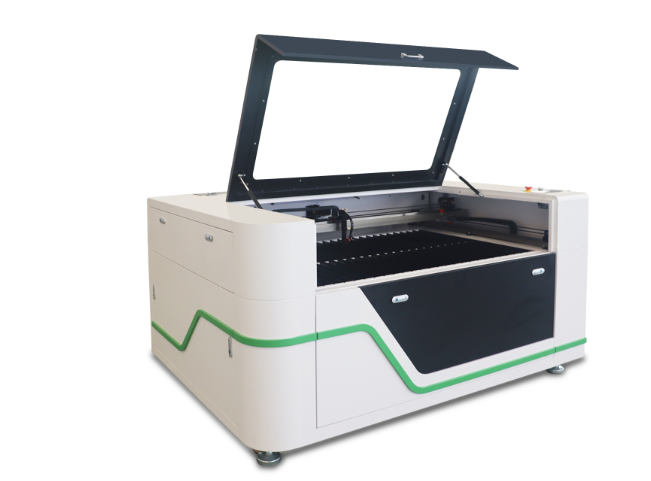
When a single CO₂ laser engraving and cutting machine handles both operations, the sequence of vector layers directly determines output quality and throughput. Effective job sequencing begins by assigning all engraving layers before cutting layers—because engraving requires the material to remain stationary; cutting early would release parts and misalign subsequent engraving passes. Nesting then arranges components to minimize waste while respecting this order—placing cut lines around engraved features only after engraving is complete. Vector order within each layer also matters: fine details should run before large fill areas, so heat-affected zones don’t distort delicate features. Pass optimization refines further—multiple low-power passes often replace a single aggressive cut to reduce charring and improve edge quality, especially on thicker substrates. Given that 92% of mid-tier CO₂ laser engraving and cutting machines support mixed-mode jobs (LaserMarking Report 2023), a deliberate layer-based strategy becomes essential to prevent rework and material waste.
Dialing in a CO2 laser engraving and cutting machine for mixed jobs means treating each material transition as a separate calibration event. Profitability and scrap reduction both hinge on how cleanly the beam switches from shallow marking to deep severing—without manual re-focusing.
Acrylic demands high-power, low-speed passes for flame-polished cutting edges—but engraving requires rapid, lower-power raster scanning to avoid melting. Wood varies by density: birch tolerates ~12% faster speeds than walnut without charring, while leather engraving typically succeeds at 35–50% power with multiple quick passes to prevent carbonization. Starting from manufacturer baseline settings and systematically logging test grids helps isolate optimal parameters for each substrate. In hybrid jobs—where a single sheet is both scored and cut—assigning per-color layer settings in LightBurn-class software prevents blow-throughs and under-engraved details.
Auto-tune algorithms assume a single operation type and homogeneous material; they rarely account for thermal re-depositing that occurs when an engraved surface darkens just before a cut—altering absorption and increasing localized heat. Manual calibration solves this by running a step-wedge test that varies power and speed in the actual job sequence order. Operators record the minimum energy needed for a clean cut after the surface has been engraved, then lock those values into the job file. That six-minute routine covers 95% of hybrid tasks—while global “auto” modes frequently lead to rework or wasted stock.
1. What is the difference between laser engraving and laser cutting?
Laser engraving modifies only the surface of a material through ablation, creating contrast and texture. Laser cutting, however, fully penetrates the material to separate it entirely.
2. Can a single machine perform both laser engraving and cutting?
Yes, most mid-tier CO2 laser engraving and cutting machines can seamlessly switch between engraving and cutting using integrated control software.
3. What materials can be processed with a CO2 laser engraving and cutting machine?
CO2 lasers can process a variety of materials, including wood, acrylic, leather, plastics, and some fabrics, among others. Material-specific settings are required to optimize results.
4. Why is job sequencing important for combined laser operations?
Sequencing ensures engraving is completed before cutting, preventing misalignment caused by released parts. This improves overall precision and efficiency.
5. What are the advantages of sequential over simultaneous operation modes?
Sequential operation reduces misalignment, improves repeatability, and supports intelligent nesting, which minimizes material waste and ensures quality output.


 EN
EN


